
Inside a tree-service website: designed for the customer on a phone
Inside the build · Website design
By James, JP Dev Labs
October 9, 2026
A useful service-business website answers three questions: what do you do, where do you work, and how can I ask about a job?
Here is a closer look at our Northwood Tree Care demonstration. These are actual screenshots of the site on a phone, with the thinking behind the layout. You can open the full example and try its navigation yourself.
The brief
Business: a fictional tree service.
Structure: five pages, built around services, work examples and an estimate request.
Purpose: demonstrate our website design. Stock photos; no tree services offered. The sample form does not send or save information.
Take a look around. Open the five-page example, check the services and see how the sample request is arranged.
01 / THE FIRST SCREEN
Give the visitor a place to start.
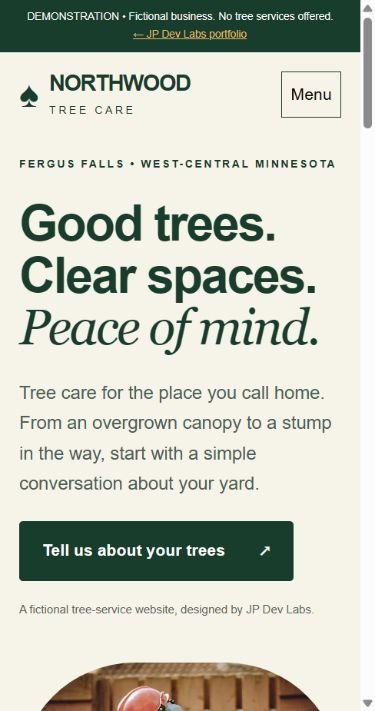
Northwood’s opening pairs a short headline with a plain explanation of tree care. The sample location sits above it, and one large button leads toward a request. A visitor gets the introduction before having to explore the rest of the site.
The menu stays compact on a phone. Services, work examples and contact details are available through familiar page names. The first screen sets a direction; the other pages provide the detail.
Try it on your own site: can someone who has never met you explain what your business does from the first screen?
02 / SERVICES AND COVERAGE
Explain the job, then make the next step useful.
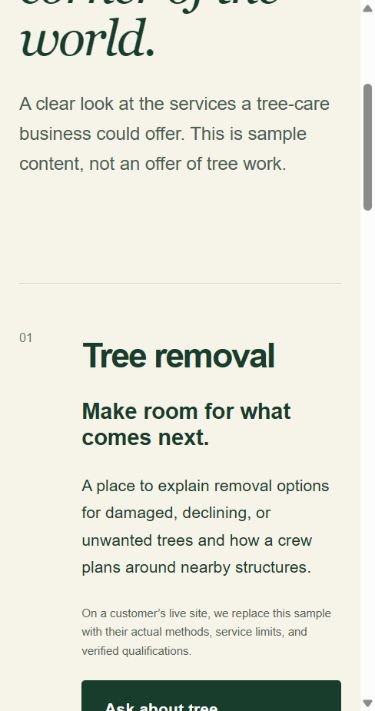
The services page separates tree removal, pruning and stump grinding. Each section has enough context to help a homeowner recognize their type of job. Its request link gives someone a next step after reading about that service.
The example also lists a sample coverage area around Fergus Falls. A real business needs its actual base and the places it normally works. That helps a customer decide whether their town is a fit before writing an inquiry.
On a customer’s site, these sections would use their own methods, service limits and verified qualifications. Specific details make the page useful. Any claims about insurance, licensing or specialist work need the business’s confirmation.
Try it on your own site: can a customer find both their type of job and their town without searching through old posts?
03 / THE REQUEST
Make it clear what happens when someone reaches out.
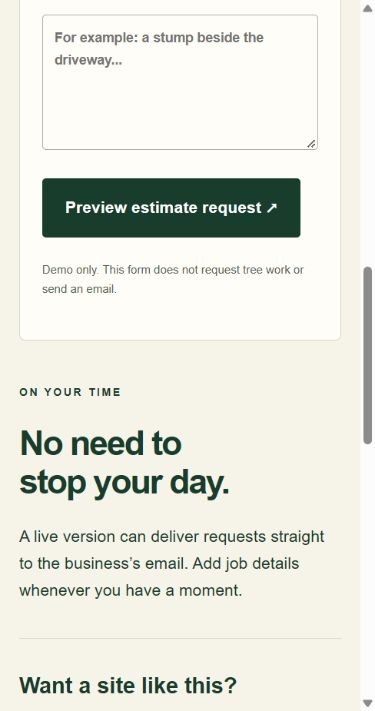
A short inquiry should gather what the business needs to begin a conversation. Clear labels and an obvious button matter on a small screen, where every extra step takes space and attention.
Northwood uses a preview button and a visible demo notice. Its form does not send an email, save details or request tree work. For a real website, we agree on the information to collect, connect the form to the customer’s email, and have them confirm that a labeled test inquiry arrives before launch.
A request starts a conversation. The business still needs to discuss the job and arrange an estimate; the basic website form does not calculate a price or book an appointment.
Try it on your own site: is the next step easy to find, and does the visitor know what they are asking for?
Your website should use your business’s real details.
This example shows a structure we can discuss. Your finished site would be planned around your services, customers and visual identity. We would agree on the pages and features before starting.
- Services and towns: the work you accept and the places you actually serve.
- Photos: your own job images, with permission and short captions explaining the work.
- Contact: the phone, email or inquiry path your business can reliably handle.
- Search basics: descriptive page titles, clear headings and useful service information.
For the full checklist, read what a tree-service website should include. Our pricing guide explains the $1,000 five-page build, optional annual care and separately quoted extras.
Want a useful first step for your business?
Send your website link and I’ll email three practical improvements—no meeting or purchase needed. Only have a Facebook page? Send that and tell me what you do.
JP Dev Labs · Fergus Falls, Minnesota · We aim to reply within 2–3 business days.
Northwood is our fictional design demonstration, not a paid client project. Screenshots captured October 5, 2026. This walkthrough explains design choices; it does not report customer results.
LET’S START WITH YOUR BUSINESS
Ready for a website that feels like you?
Tell us what you do and what you have in mind. Prefer a small first step? Send your link and we’ll email three practical improvements, no meeting needed.